
TL;DR: Most hosting decisions fail because businesses choose based on price or brand recognition instead of actual needs. Server farms cram hundreds of sites onto low-end machines, causing slow load times and poor performance. Business-level hosting (like WebWize Stack on WPEngine) solves most problems. When traffic and complexity grow, custom configurations (WebWize XCloud) let you scale based on real data, not guesses. Monitor CPU usage, traffic patterns, and site type to know when to upgrade.
Answer Summary
- Server farms slow you down by forcing your site to compete with 100-200 other sites for resources on one machine
- Business-level hosting (WPEngine) delivers immediate speed improvements through dedicated resources and CDN optimization
- Upgrade to custom configurations when CPU hits 100% during peak hours or you’re running complex e-commerce/headless setups
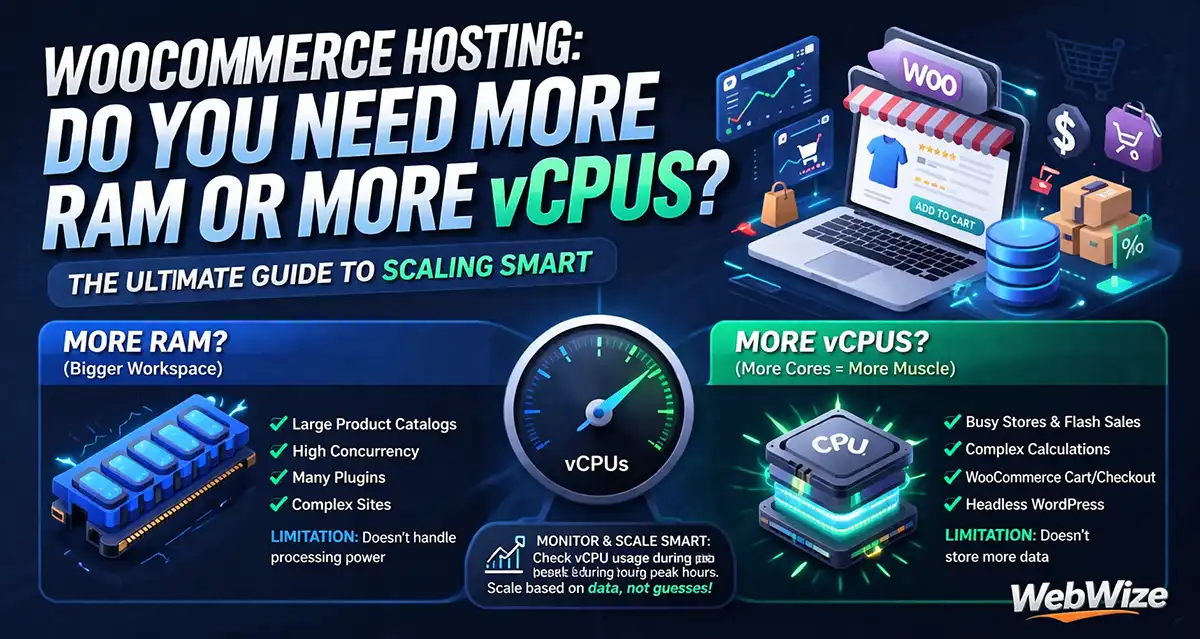
- WooCommerce sites need more vCPUs (not RAM) because cart calculations and product variations consume processing power
- Headless WordPress shifts bottlenecks to API calls, requiring 3x more server capacity than traditional setups
I’ve taken hundreds of calls that start the same way.
"My site won’t load." "Images aren’t showing up." "Everything’s slow and I can’t get support."
Almost every time, I ask one question: What hosting company are you with? The answer tells me everything.
They’re on a server farm.
A shared server where 100 to 200 websites compete for resources on one low-end machine. The hosting company brags about hosting 4 million sites… but they’re not interested in helping anyone. They want the $10 a month and the numbers to show investors.
Here’s what I’ve learned after 30-plus years: hosting decisions fail because people choose based on price or brand recognition, not on what their site needs. Six months later, performance tanks and they’re calling someone like me to fix it.
This is the framework I use at WebWize to match hosting infrastructure to your requirements. No corporate fluff about "enterprise solutions." Just the variables that matter and the lessons I learned from watching projects crumble on inadequate infrastructure.
The Server Farm Problem Nobody Talks About
Shared hosting holds 37.64% of the global web hosting market. Massive reach… but also the source of most performance complaints I see.
The model forces your website to share bandwidth, RAM, and storage with dozens or hundreds of other sites. When one site gets a traffic spike at night, everyone else on that server slows down. When someone’s running heavy database queries, your page load time suffers.
You’re not getting business-level infrastructure… you’re getting a slice of an overloaded machine.
I see this as a scam. You’re not giving people anything real for that $10 a month. You can’t support a website properly at that price point, so it becomes a two-way street where nobody wins.
The ethics matter to me. Selling someone a car with one tire already flat and then justifying it because you charged a quarter of the normal price isn’t right. The same logic applies to hosting.
That’s why WebWize refuses to offer server-farm hosting. We only provide business-level servers where your site gets the resources it needs without competing with hundreds of others.
Bottom line: Server farms sacrifice your performance for their profit margins. Business-level hosting gives your site the resources it needs to perform.
How I Diagnose What’s Actually Wrong
When someone calls with performance issues, I start with the hosting company name. There’s a set of companies owned by large conglomerates known for cramming as many sites as possible onto low-end servers. If they’re on one of those, I’ve found the problem.
If they’re not on a known server farm, we dig deeper. I look at traffic patterns, check image sizes, review the code. There’s a process to diagnose what’s choking performance.
The first issues I usually find:
- Images that are too large and not properly compressed
- Underpowered servers with only one or two CPUs and minimal RAM
- Traffic spikes that overload whatever resources they have
- E-commerce solutions running on infrastructure that can’t handle the processing load
There’s a difference between "server farm" and "underpowered server." Both create problems, but the diagnosis changes based on what you’re dealing with.
Bottom line: Start with the hosting company name. If they’re on a known server farm, you’ve found the problem. If not, check images, CPU allocation, and traffic patterns.
What Changes When You Move to Business-Level Hosting
I’ve had immediate success moving clients from server farms or underpowered servers to our WebWize Stack on WPEngine. They see it right away… page load times drop significantly. Everything feels faster.
We also use CDNs to offload CPU work. That combination of business-level infrastructure plus proper content delivery creates a noticeable performance jump clients feel within hours of migration.
The data backs this up. A 1-second delay in page load time results in a 7% reduction in conversions. When you’re on an overloaded server where resources are stretched thin, that delay compounds. You’re losing money because your hosting can’t handle the load.
Our own agency site runs on WPEngine. That’s not an accident. It’s the foundation we use for most projects because the infrastructure is solid for the majority of use cases. We’re not selling you something we wouldn’t use ourselves.
Bottom line: Moving to business-level hosting creates immediate, measurable speed improvements. Clients feel the difference within hours.
When Standard Hosting Isn’t Enough
Page speed matters for SEO. Google confirmed it as a direct ranking factor back in 2018. 53% of mobile visitors abandon sites taking longer than 3 seconds to load. When page speed analysis becomes critical for your business, we start the conversation about WebWize XCloud.
The jump makes sense when you have the traffic and the budget. You’re moving from around $40 monthly to $85-$100 monthly minimum. You get much better performance, CDNs, edge caching, and high-end server techniques standard hosting can’t provide.
But here’s where it gets nuanced… it depends on what your site actually does.
Running an informational site with text and a 30-page structure on a regular server? You can probably handle 500 to 1,000 unique visitors daily. Maybe more if your images are compressed and you’re using CDNs properly.
Running WooCommerce with product variations and processing traffic plus orders? You might only handle 200 to 700 visitors daily before things start choking. WooCommerce sites are uniquely prone to CPU bottlenecks because of their dynamic, real-time nature. Every cart update triggers AJAX requests, session updates, and server-side calculations.
The threshold also depends on how many people are on your server at one time. You can’t give a blanket statement because there are too many variables built into the website, the processing power, and the site type.
Bottom line: Traffic thresholds vary by site type and complexity. E-commerce sites need upgrades sooner than informational sites because of processing demands.
What I Actually Monitor Before Recommending an Upgrade
I watch CPU usage. I get on the site, see how things load. There are statistics and logging tools showing how much CPU gets used throughout the day, especially at peak times.
When your CPU graph shows you’re hitting close to 100% for several hours per day even after optimization, that’s the signal. Consistent overloading strains your hardware. You’ve outgrown your current plan.
That’s when I open the conversation. "We need to start talking about moving you up to the next server level or two levels up." The data drives the decision, not assumptions about what you might need someday.
Bottom line: Watch CPU usage at peak times. When you’re hitting 100% consistently after optimization, the data is telling you to upgrade.
The Custom Configuration Piece That Actually Matters
WebWize XCloud configures anything. RAM allocation, SSD storage size, vRAM, processing cores… we build the setup based on your performance data rather than forcing you into preset tiers.
This comes from 30-plus years of knowing what setup matches what situation. When I see we’re on a specific server with a certain traffic amount and site type, and we’re already hitting the top of CPU usage from business hours start until after closing, I know what the conversation needs to be.
"We can make this move now and give you a little more room to grow, or we can make it and give you a lot of room to grow before we have to have another conversation." There are options with redundant servers, load balancing, other configurations giving you exactly what you need.
But here’s what surprises people: throwing more RAM at a problem doesn’t always fix it.
I’ve seen clients assume doubling the RAM will speed up everything. But if your bottleneck is CPU processing power or disk I/O because you’re running massive database queries, more RAM sits there unused.
The pattern I’ve learned: look at what’s choking first. With WooCommerce sites, it’s usually not memory. It’s the number of virtual CPUs trying to process all those product variations and cart calculations simultaneously. You might need to bump from 2 vCPUs to 4 or 6 before you even think about RAM.
The other thing catching people off guard is SSD size. They think "I only have 50GB of content, why would I need 200GB of SSD?" Caching, logs, and temporary files from processing eat up space fast, especially on high-traffic e-commerce sites. Running out of disk space will crash your site faster than running low on RAM.
Bottom line: More RAM won’t fix CPU bottlenecks. Identify what’s choking first, then configure the right resource upgrade.
When Headless WordPress Changes Everything
Headless WordPress changes the entire hosting conversation because you’re not serving pages anymore… you’re serving API calls.
With traditional WordPress, the server renders the page and sends it to the browser. Done. With headless, you’ve got WordPress as the backend handling content through the REST API or GraphQL, then your React frontend making constant API requests to pull that data.
The bottleneck shifts entirely to API response time and concurrent API calls your server handles. A traditional WordPress site might handle 1,000 visitors fine, but that same server with a headless setup might choke at 300 because each page view triggers 10 to 15 API calls instead of one page render.
This is where WebWize XCloud becomes necessary rather than optional. You need more vCPUs to handle those concurrent API requests. You need better caching strategies at the edge. And honestly, you need someone who understands how to optimize the API endpoints themselves.
Agencies will build a beautiful React frontend and then wonder why performance tanks. It’s because they’re hammering a WordPress backend that wasn’t configured for that kind of load.
The other reality: headless setups often need separate hosting for frontend and backend. Your React app might be on Vercel or Netlify, but your WordPress API still needs serious horsepower. That’s the conversation people aren’t ready for when they come to me excited about going headless because they read it’s "faster."
Bottom line: Headless WordPress shifts the bottleneck from page rendering to API response time. The same traffic requires 3x the server capacity.
How I Have the Headless Conversation
I’m honest, but I frame it around their goals. I ask: "Why do you want to go headless? What problem are you trying to solve?"
They say "I want it to be faster" or "I heard it’s better for SEO." That’s when I redirect the conversation. "Let’s talk about what ‘faster’ means for your situation. Running a content site with 50 pages getting 500 visitors daily? We can make your current WordPress setup scream with proper caching and CDN configuration. You’ll get the speed without the complexity and cost of headless."
But if they’re building something needing headless… like a complex application with interactive features, or they need to push content to multiple frontends (web, mobile app, kiosks)… then I get excited with them. "This makes sense for what you’re building, but here’s what we need to plan for." Then I walk them through the infrastructure requirements, the API optimization work, the hosting costs.
The key: I don’t tell them no. I tell them what it takes to do it right. Some people hear that and realize they don’t need headless. Others hear it and say "Let’s do it" because they understand the investment matches their goals.
Either way, they’re making an informed decision instead of jumping into something blowing up six months later when their API can’t handle the load.
Bottom line: Frame the headless conversation around their actual goals. Make sure they understand the infrastructure requirements before committing.
Why I’m Moving WebWize to Headless
We’re not having problems with our current WPEngine setup. But I want to see what the page speed differential is with headless. I want to gain the knowledge of setup, what I can and can’t do in the WordPress backend with headless, understanding everything involved.
That way I can discuss this conversation with clients properly. I’m using our own site as the testing ground to understand the full experience before recommending it broadly.
The most important thing I’m curious about: how to construct the content of each page. WordPress has a simple, non-coding content management system vital for most businesses. With our Divi theme, it gives people flexibility with design.
With headless, that design flexibility gets reduced because it’s built on the frontend. Seeing that true difference and understanding it day-to-day is where I’m interested to learn. That’s the trade-off nobody talks about… the content editing experience changes fundamentally.
Bottom line: Testing on your own infrastructure builds credibility. You learn the trade-offs firsthand before recommending to clients.
The Framework I Use With Every Client
Start with our proven WebWize Stack on WPEngine. Measure performance under real load. Then scale to WebWize XCloud with custom configurations based on data rather than assumptions about future growth.
This approach prevents over-engineering and under-investing. You’re not paying for infrastructure you don’t need yet, but you’re also not stuck on a server that can’t handle your traffic.
The variables that matter:
- Traffic patterns (sustained daily visitors, not occasional spikes)
- Site type (informational content vs. e-commerce vs. application)
- CPU usage during peak hours (the metric that tells the real story)
- Database query complexity (WooCommerce, membership sites, custom applications)
- Architecture requirements (traditional WordPress vs. headless setups)
When you evaluate your situation against these measurable factors, the decision becomes clear. It depends on what your site does, not what you think it might need.
What This Comes Down To
After 30-plus years, the core reason I only offer business-level servers is simple. I see server farm hosting as a scam. You’re not giving people anything real. You’re taking the $10 monthly and leaving them on their own.
There’s ethics involved in my decision. Selling someone infrastructure that’s already failing them isn’t right, even if you justify it with a lower price.
At WebWize, we start with solid business-level hosting on WPEngine. When your data shows you need more, we move you to WebWize XCloud with custom configurations matching your exact requirements. No preset tiers. No forcing you into packages that don’t fit.
The optimization approach is slow and compound. Monitor your performance. Make decisions based on what’s choking. Scale when the data tells you to scale.
That’s how hosting decisions stop failing before they even start.
Common Questions About Hosting Decisions
How do I know if I’m on a server farm?
Ask your hosting provider how many sites share your server. If they’re vague or the answer is "hundreds" or "unlimited," you’re on a server farm. Also check if you’re paying under $15 per month for hosting. That price point makes it impossible to provide dedicated business-level infrastructure.
What’s the difference between shared hosting and business-level hosting?
Shared hosting (server farms) cram 100-200+ sites onto one low-end machine where everyone competes for CPU, RAM, and bandwidth. Business-level hosting gives your site dedicated resources without that competition. You’re not fighting other sites for processing power when traffic spikes hit.
When should I upgrade from WPEngine to WebWize XCloud?
Upgrade when your CPU usage hits 100% for multiple hours during peak times, even after optimization. Also upgrade when you’re running complex e-commerce with heavy product variations, when you’re building headless WordPress setups, or when page speed becomes a competitive advantage for your business.
Why do WooCommerce sites need more powerful hosting?
WooCommerce triggers constant processing. Every cart update, product variation selection, and checkout step fires AJAX requests and server-side calculations. A site with 300 products and multiple variations will consume far more CPU than an informational site with 300 pages of content.
Does headless WordPress always perform better than traditional WordPress?
No. Headless shifts performance bottlenecks to API calls instead of page rendering. If your WordPress backend isn’t configured to handle 10-15 API calls per page view, performance will tank worse than traditional WordPress. Headless needs 3x the server capacity for the same traffic volume.
How much does custom hosting configuration cost compared to standard plans?
Standard business-level hosting (WPEngine) runs around $40 per month. Custom configurations (WebWize XCloud) start at $85-100 per month. The price depends on your actual resource needs (vCPUs, RAM, SSD size) based on performance data, not preset package tiers.
What happens if I run out of disk space on my server?
Your site crashes. Running out of disk space is worse than running low on RAM because the server can’t write cache files, logs, or temporary processing files. E-commerce sites with high traffic need 3-4x more SSD space than their actual content size to handle caching and processing overhead.
Should I upgrade RAM or CPU first when performance slows down?
Check what’s choking first. If CPU usage is consistently hitting 100%, you need more vCPUs. If your site is swapping to disk because RAM is full, you need more memory. For WooCommerce and headless setups, CPU is the bottleneck 80% of the time, not RAM.
Key Takeaways
- Server farms sacrifice performance for profit by cramming hundreds of sites onto low-end machines. Avoid any hosting provider charging under $15 per month.
- Business-level hosting (WPEngine) solves most performance problems through dedicated resources and CDN optimization. Clients see immediate speed improvements after migration.
- Upgrade thresholds depend on site type. Informational sites handle 500-1,000 daily visitors. WooCommerce sites with product variations choke at 200-700 visitors because of CPU-intensive processing.
- Monitor CPU usage during peak hours. When you’re hitting 100% consistently after optimization, your data is telling you to upgrade.
- More RAM won’t fix CPU bottlenecks. Identify what’s choking (CPU, RAM, or disk I/O) before configuring upgrades. WooCommerce needs vCPUs, not memory.
- Headless WordPress requires 3x the server capacity of traditional WordPress because each page view triggers 10-15 API calls instead of one page render. Configure your backend for API load before launching.
- Scale based on performance data, not assumptions about future growth. Start with proven infrastructure, measure under real load, then upgrade when metrics show you’ve outgrown your current setup.